Cheap SD Cards Are Ruining Your Footage (And You Don't Even Know It Yet)
Your Camera Is Only as Fast as the Card Inside It
Let's paint a familiar picture. You're at a live event — maybe a wedding reception, a local skate session, or a product launch you've been hired to cover. The moment hits. You press record. The camera hesitates, the buffer indicator starts blinking, and by the time your gear catches up, the shot is gone. You rewind mentally and blame the camera. But nine times out of ten, the real culprit is sitting right in that card slot.
Storage is one of the most overlooked specs in a creator's kit. People will spend hours comparing sensor sizes, autofocus systems, and lens sharpness charts — then grab whatever SD card is on sale without a second thought. That's a mistake that costs real footage.
What Write Speed Actually Means in the Real World
Every camera has an internal buffer — basically a short-term memory bank that temporarily holds image data before writing it to your card. When you shoot a burst of RAW photos or record high-bitrate video, your camera is generating data faster than most cards can permanently store it. The buffer absorbs the overflow.
Here's the problem: if your card's write speed can't drain that buffer fast enough, it fills up. Once it's full, the camera either stops recording entirely or starts dropping frames. In video, dropped frames can mean corrupted files. In burst photography, it means your camera just... stops shooting mid-sequence.
Write speed is measured in megabytes per second (MB/s). A camera shooting 4K at 100Mbps (megabits per second — note the lowercase 'b') needs a card that can sustain at least 12.5 MB/s just to keep up. But that's the bare minimum. Real-world sustained write speeds on budget cards often fall well below their advertised numbers, especially when the card starts getting full.
The Speed Class System, Explained Without the Headache
Sd cards use a tiered classification system that's honestly more confusing than it needs to be, but here's the short version:
- Class 10 / U1: Minimum 10 MB/s write speed. Fine for 1080p video, not much else.
- U3: Minimum 30 MB/s. The starting point for 4K shooting.
- V30: Video Speed Class 30 — same floor as U3 but more reliably sustained. Good for most 4K workflows.
- V60: Minimum 60 MB/s sustained. Necessary for 4K at higher bitrates, some 6K formats.
- V90: Minimum 90 MB/s sustained. Required for 8K, high-frame-rate 4K, and RAW video on cameras like the Sony A7S III or Canon EOS R5.
That last part matters: sustained write speed. A card might hit 90 MB/s in a burst and then throttle down to 40 MB/s after a few seconds. Manufacturers love to advertise peak speeds. What you actually need to know is how the card performs over a continuous 10-minute recording — and budget cards almost always disappoint there.
Real Scenarios Where the Wrong Card Destroys Your Shoot
Wedding videographers: You're recording the vows in 4K. The officiant is mid-sentence. Your buffer fills, the camera stops recording, and you get a corrupted clip. There's no second take. A V60 or V90 card doesn't just improve your workflow — it's essential insurance.
Sports and wildlife photographers: You're tracking a wide receiver running a route or a hawk diving toward prey. You need sustained burst shooting at 20+ frames per second. A slow card means your burst stops after 8 frames instead of 40. Missed peak moment, every time.
Travel vloggers: You're shooting a mix of handheld 4K and occasional slow-motion clips on a mirrorless body. A mid-tier V30 card might keep up most of the time, but flip into that 4K 120fps mode and you're asking for trouble without at least a V60.
Studio product shooters: Lower-stakes scenario, but if you're shooting tethered or doing extended time-lapses, card reliability and longevity matter more than raw speed. Cheap cards also tend to fail sooner, and losing a client's product shoot to a dead card is a nightmare no one wants.
The Cards Worth Actually Buying
Here's a practical breakdown by shooting style:
For casual 1080p and light 4K content creators: The SanDisk Extreme (not Extreme Pro — the standard version) hits V30 speeds reliably and comes in at a reasonable price. It's the floor, not the ceiling, but it'll handle most YouTube-style shooting without drama.
For serious 4K shooters and hybrid photographers: The Sony TOUGH series (V60 or V90) is genuinely worth the premium. Sony built these cards to survive drops, bends, and waterlogged camera bags — and they deliver on sustained performance. The Lexar Professional 2000x is another strong V90 contender at a slightly friendlier price point.
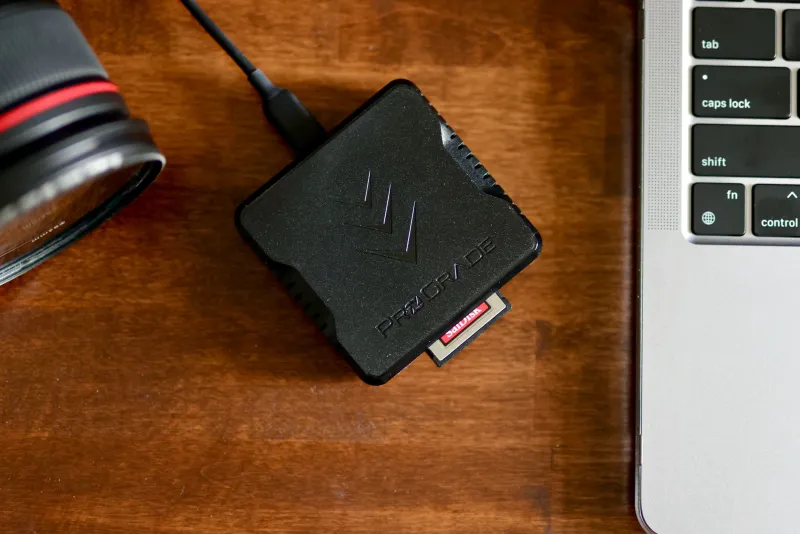
For high-bitrate video, RAW formats, and 8K: You're in V90 territory, full stop. The ProGrade Digital V90 cards are a favorite among working professionals for a reason — consistent sustained speeds and a solid track record in demanding environments. Yes, they're expensive. So is losing a shoot.
For CFexpress shooters (many newer flagships use this format): The Angelbird AV PRO CFexpress and Delkin Devices BLACK series are both excellent. Make sure you're also investing in a quality card reader — a slow reader will bottleneck your editing workflow even if the card itself is fast.
Don't Forget the Backup Workflow
Fast cards solve the recording problem. They don't solve the losing your footage problem. A solid field backup habit is just as important as the card itself.
If you're shooting anything that can't be recreated — events, documentary work, travel — consider shooting to dual card slots simultaneously if your camera supports it. Cameras like the Sony A7 IV, Nikon Z6 III, and Canon EOS R6 Mark II all offer dual slots for exactly this reason.
For solo shooters without dual slots, a portable SSD backup device like the Gnarbox or SanDisk Professional Pro-Blade lets you offload cards in the field without a laptop. Get in the habit of backing up every card before you format it. Every time.
The Bottom Line
Your camera's specs only matter if your storage can keep pace. A $400 SD card budget sounds steep until you compare it to the cost of a corrupted wedding video or a missed editorial deadline. Speed classes aren't marketing fluff — they're a direct reflection of whether your gear can handle what you're asking it to do.
Before you start shopping for your next camera body or lens, open up your card case and take a hard look at what's in there. If you're still running on V10 cards from five years ago, that's your upgrade. It's not glamorous, but it might be the single most impactful gear change you make this year.