Your Camera Is Cooking Itself — Here's How to Keep It Running Through a Full Shoot
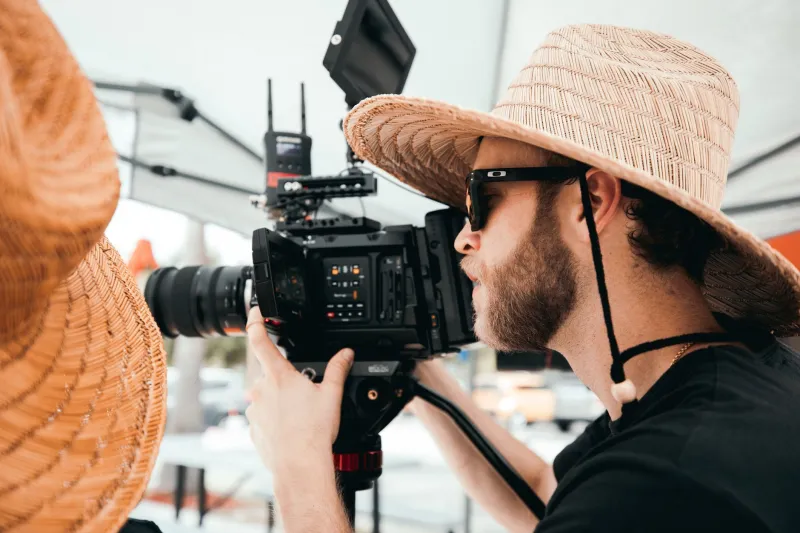
You're three hours into a live event, a wedding ceremony, or a long-form interview setup. Everything looks perfect. Then your camera flashes a temperature warning and shuts down. The shot is gone, your client is staring at you, and no amount of blaming the weather is going to fix this.
Camera overheating isn't a rare edge case anymore. As creators push bodies harder — recording 4K at high bitrates, running continuous livestreams, shooting in direct sunlight — thermal management has become one of the most important (and least discussed) factors in choosing gear. Let's get into what's actually happening inside your camera and what you can do about it.
Why Cameras Overheat in the First Place
Modern camera sensors, especially those handling high-resolution 4K or 6K video, generate a significant amount of heat during continuous operation. Image processors, like Sony's BIONZ XR or Canon's DIGIC X, are essentially small computers running at full tilt every second you're recording. Add in a hot summer day, direct sunlight on a dark camera body, or a tight enclosed bag between takes — and you've got a recipe for a thermal event.
The real problem is that most mirrorless and DSLR bodies aren't built with aggressive cooling in mind. Manufacturers prioritize compact form factors and weather sealing over heat dissipation. There's no fan, no active airflow, and very limited surface area to radiate heat away from the sensor and processor stack. The camera just has to absorb it.
When internal temps hit a threshold — which varies by manufacturer and body — the camera triggers a thermal shutdown to prevent component damage. This isn't a bug; it's a safety feature. But that doesn't make it any less of a workflow killer.
Which Cameras Are Most Vulnerable
Not all bodies are equal here, and this is where it pays to do your homework before buying.
Compact mirrorless bodies tend to run hot fastest. The Sony A7 series, for example, has a well-documented history of thermal issues in earlier generations, particularly the A7 III and A7S II during extended 4K recording. Sony addressed this with the A7S III, which includes improved heat dissipation, but it's not immune under extreme conditions.
Canon's EOS R5 became infamous at launch for its thermal limitations during 8K and high-bitrate 4K recording. Canon has since pushed firmware updates that improved the situation, but the underlying hardware constraints haven't changed.
Blackmagic Pocket Cinema Cameras — the BMPCC 4K and 6K — are known to run warm during continuous shooting. They're workhorses, but you'll want to plan around their thermal behavior on long shoots.
On the flip side, dedicated cinema cameras like the Sony FX6, Canon EOS C70, and Blackmagic URSA Mini Pro are engineered with heat management as a core design requirement. They're larger, heavier, and pricier — but they're built to run all day without complaint.
The Gear That Actually Helps
If you're committed to your current body or working within a budget, there's a real ecosystem of cooling solutions worth knowing about.
External Cooling Fans
Small USB-powered fans designed to mount on a camera cage or cold shoe are a legitimate solution for stationary setups — studio shoots, interviews, livestream rigs. Brands like Tilta have released dedicated camera cooling fans (the Tilta Nucleus-Nano Cooling Fan, for example) that clip directly onto specific bodies and actively pull warm air away from the chassis.
These aren't magic. They won't drop your sensor temp by 20 degrees, but they can meaningfully extend your record window before a shutdown warning appears — often enough to get through a critical shot.
Camera Cages and Heat Dissipation
A quality aluminum cage does more than protect your body and give you mounting points. Aluminum is a decent thermal conductor, and a well-fitted cage increases the surface area in contact with your camera body, helping draw heat away from the chassis passively. It won't replace active cooling, but it's a useful secondary benefit on top of the protection and rigging advantages you're already getting.
Look for cages from SmallRig, Tilta, or Wooden Camera — all solid options with good fitment and genuine aluminum construction.
Dummy Battery Power Solutions
This one surprises people: running your camera on AC power (via a dummy battery adapter connected to a wall outlet or a V-mount power system) can actually reduce thermal output compared to running on internal batteries. Internal batteries generate their own heat during discharge. Eliminating that heat source from inside the camera body gives the processor and sensor a bit more thermal headroom.
For studio or vehicle-based shoots, a dummy battery adapter paired with a reliable AC adapter is one of the cheapest thermal improvements you can make.
Environmental Awareness and Shoot Planning
This is free gear, and it matters more than most people admit. Keeping your camera in the shade between takes, avoiding leaving it in a hot car or bag in direct sun, and giving it a 10-minute cooldown between long recording sessions can extend your operational window significantly.
For outdoor event work, a simple reflective camera wrap or even a white lens cloth draped over the body can reduce solar heat absorption enough to matter. It's not a glamorous solution, but it's the kind of practical knowledge that separates working pros from people who lose shots.
What to Look for When Buying for Long-Form Work
If you're in the market for a new body and extended recording is a regular part of your workflow — think event videography, documentary work, livestreaming, or corporate video — thermal performance should be on your checklist alongside resolution and codec options.
Look for bodies that explicitly advertise unlimited recording or have been third-party tested for extended runtime. The Sony ZV-E1, Sony FX30, and Canon EOS R7 have all shown improved thermal behavior compared to earlier generations. The Nikon Z8 and Z9 also perform well in extended recording scenarios.
And if you're running a dedicated livestream or broadcast setup, just budget for a proper cinema or broadcast body from the start. The cost difference pays for itself the first time you don't lose a critical shot.
The Bottom Line
Camera overheating is a solvable problem, but it requires honest awareness of your gear's limits and a willingness to invest in the right supporting equipment. An external cooling fan, a quality cage, smart power management, and some basic environmental discipline can get most consumer-grade bodies through demanding shoots without a thermal shutdown.
If your workflow regularly demands multi-hour continuous recording and your current body keeps tapping out, it might be time to step up to hardware that's actually built for the job. Your camera is only as reliable as its ability to keep running — and no amount of post-processing fixes a shot you never got.