The Memory Card Tax: What Cheap Storage Is Really Costing Your Content
You did the research. You compared sensors, read the spec sheets, watched eighteen YouTube reviews, and finally pulled the trigger on a camera that genuinely excites you. And then, at checkout, you grabbed whatever memory card was bundled nearby or, worse, dug out the one from your old point-and-shoot. Sound familiar?
Here's the thing — that decision, the one that felt like responsible frugality, might be costing you more than the camera itself. Not in dollars upfront, but in dropped frames, corrupted files, missed shots, and the slow-burn misery of a shoot that falls apart because your card couldn't keep up with your camera.
Storage is the unglamorous backbone of content creation, and it's the part almost every creator underestimates until something goes catastrophically wrong.
Write Speed Isn't a Marketing Number — It's a Hard Limit
Every camera that shoots high-bitrate video has a minimum write speed requirement. Shoot 4K at 120fps in a LOG format and you might be pushing 800 MB/s or more through that card slot. If your card's sustained write speed tops out at 90 MB/s, the camera will either refuse to record, drop the bitrate automatically, or — and this is the worst outcome — appear to record fine and then hand you a corrupted file you won't discover until you're back at your desk.
Card manufacturers love to advertise peak read speeds in giant font on the packaging. The number that actually matters for video is sustained write speed, which is typically buried in the fine print or hidden entirely. A card rated at "up to 300 MB/s" might sustain only 150 MB/s under real-world continuous recording conditions. For stills photographers shooting bursts, buffer depth becomes the limiting factor. Either way, the cheap card isn't neutral — it's actively working against you.
When you're shopping for cards, match the spec to your camera's requirement and then buy a little headroom above it. If your camera needs 250 MB/s sustained write, don't buy the card that barely clears that threshold.
The Card Format Maze
SD, SDHC, SDXC, CFexpress Type A, CFexpress Type B, CFast, XQD — the alphabet soup of card formats is genuinely confusing, and it matters a lot because you can't always swap between them. Higher-end cameras are increasingly moving to CFexpress formats because they offer the throughput that modern video specs demand. These cards are not cheap. A single 256GB CFexpress Type B card can run $150 to $300 depending on the brand and speed tier.
That's not an argument against buying them. It's an argument for budgeting them into your camera purchase from the start, not treating them as an afterthought. If you're buying a camera that requires CFexpress cards and you only budget for the body, you haven't actually budgeted for the camera.
One Card Is Not a Backup Strategy
Let's talk about the part most tutorials skip over: redundancy. Professional productions — even small ones — operate on the assumption that any single piece of storage can fail at any time. That's not paranoia; that's just the statistical reality of flash memory.
Many mid-range and professional cameras offer dual card slots for exactly this reason. If yours does, use both. Set one as overflow and the other as a simultaneous backup, or better yet, set them to mirror each other in real time. Yes, you'll burn through cards faster. Yes, it's worth it.
If your camera only has one slot, your backup strategy shifts to what happens the moment cards leave the camera. Ideally, you're offloading to at least two separate drives on the same day you shoot. The "I'll back it up when I get home" mindset is how people lose entire wedding shoots, travel series episodes, or brand deal deliverables.
Building a Real Storage Infrastructure
Here's what a sensible storage ecosystem looks like for a working creator, scaled by how seriously you're shooting:
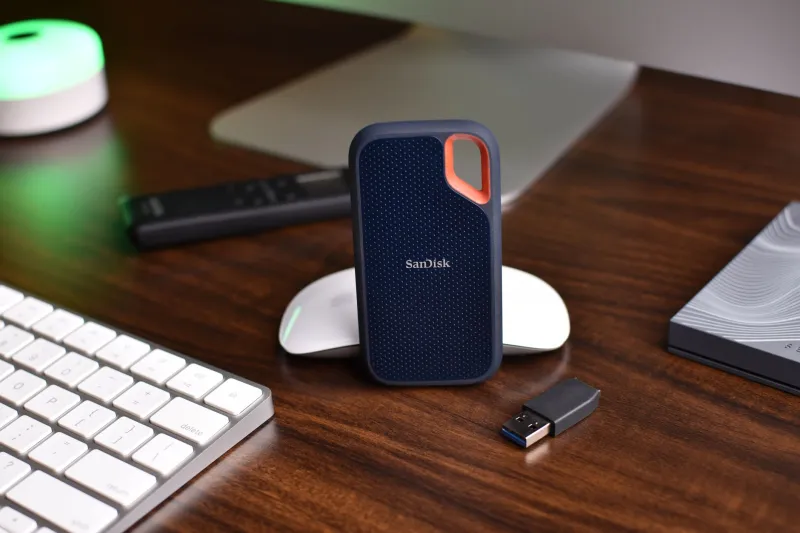
Entry level (hobbyist to part-time creator): Two portable SSDs — one primary working drive, one backup. Drives like the Samsung T7 Shield or SanDisk Extreme Pro are fast, rugged, and affordable. Pair that with a cloud backup service like Backblaze Personal Backup (~$9/month) and you've got a solid two-location strategy without spending a fortune.
Mid-level (regular posting, client work, or brand deals): A NAS (Network Attached Storage) device at home changes the game. Something like a Synology DS223 with two drives in RAID 1 configuration means your files are automatically mirrored across two physical drives. You still want offsite backup — Backblaze B2 cloud storage integrates directly with Synology and keeps costs low. Budget $400–$700 to set this up properly, and it'll serve you for years.
Professional level (full-time creator or production work): You're looking at a larger NAS with four to eight bays, faster drives, and potentially a dedicated editing RAID array for active projects separate from your archive storage. Thunderbolt RAID enclosures like those from OWC or G-Technology give you the throughput to edit 4K or 6K footage directly from the array without proxies. This is a $1,500–$3,000+ infrastructure investment, but if video is your business, it's a business expense.
The Cloud Isn't Free — But It Might Save You
Cloud storage is not a replacement for local redundancy, but it is the piece that protects you from physical disasters — theft, fire, flood, or the always-classic "I dropped my drive bag down a flight of stairs at the airport." Frame Io, Backblaze, and even Google Drive or Dropbox at higher tiers all have a role to play depending on your workflow and collaboration needs.
The math isn't always pretty. If you're shooting 2TB a month, cloud storage costs add up. But compare that to the cost of one lost project — the reshoot fees, the client refund, the reputation damage — and the monthly subscription looks like the best insurance you ever bought.
Stop Treating Storage as a Line Item to Cut
When you're building or upgrading your kit, storage infrastructure deserves a dedicated budget line, not the leftovers after you've bought everything else. A realistic breakdown for a serious hobbyist or part-time creator might look like this:
- 2x fast cards matched to your camera: $100–$300
- 2x portable SSDs for field backup: $100–$200
- Entry-level NAS + drives for home archive: $300–$500
- Cloud backup subscription (annual): $100–$150
Total: roughly $600–$1,150 to build a genuinely reliable system from scratch. That's less than most people spend upgrading a lens, and it protects everything you shoot with every piece of gear you own.
Your camera is only as good as the footage it can reliably save and the system that keeps that footage safe. The memory card you grab without thinking about it? That's not a minor accessory. It's the last link in the chain between your creative vision and a file you can actually deliver. Make sure it holds.